
How Chrome Silently Broke My kubectl for Days
A local dev server running on port 8000 intercepted an OAuth callback. Chrome cached the resulting redirect. kubectl stopped working. Nobody told me any of this.
Let me set the scene. Sunday. Token expires. kubectl triggers a fresh OIDC login. Browser opens. Hangs. Browser is sitting on http://localhost:8000/de/healthcareservices/ returning a 404. kubectl waits patiently for an auth code that will never arrive.
That’s it. That’s the entire error message. A browser tab on the wrong URL and a terminal that hangs forever.
What followed was two days of chasing ghosts through some of the most impenetrable admin consoles known to modern enterprise software.
The Actual Cause
kubelogin — the kubectl plugin that handles OIDC authentication — works like this: it starts a tiny local HTTP server on port 8000, opens your browser to that server, which immediately redirects you to your identity provider (SAP IAS / Kyma). You authenticate, the IdP sends the auth code back to http://localhost:8000?code=..., kubelogin catches it, exchanges it for tokens, done.
Except a local dev server was running on port 8000. A web application, also using SAP IAS for login. When SAP IAS redirected the auth code to http://localhost:8000?code=..., the dev server caught it, processed it as a login for itself, and redirected the browser to its own home page: http://localhost:8000/de/healthcareservices/.
Chrome cached that redirect. Permanently. In its HTTP cache.
The dev server was killed. The cache remained. Every subsequent kubectl auth attempt: SAP IAS correctly sends the code back to http://localhost:8000, Chrome silently fires the cached redirect, ships everything off to /de/healthcareservices/, kubelogin gets nothing, kubectl hangs.
No error. No warning. Just silence and a browser tab in the wrong place.
The Investigation
Here is a partial list of things that were not the problem:
- The kubeconfig (identical to the freshly generated one from the BTP cockpit)
- The SAP BTP subaccount settings and trust configuration
- The user’s role collections
- Azure AD enterprise application assignments — there was an
AADSTS50105error that looked very convincing…
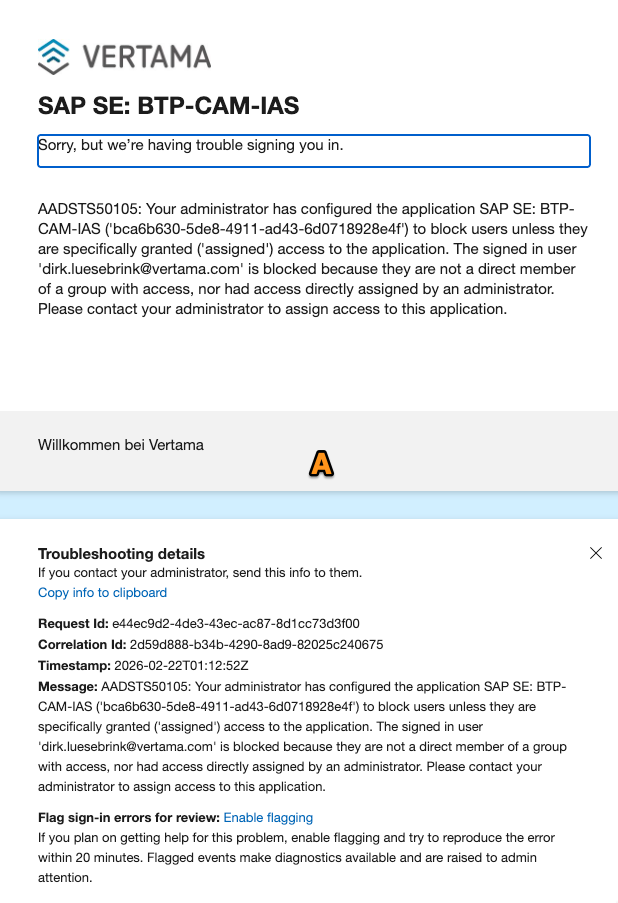
…it appeared because clearing browser cookies mid-investigation nuked the SAP IAS session, forcing a full Azure AD re-authentication that exposed an unrelated access control issue. Two admin consoles and 2 hours later, next day: still not the problem.
- Colleagues were working fine — their tokens simply hadn’t expired yet
The diagnosis came from trying Safari, making Safari my default browser. Safari had no cached redirect, and auth worked immediately. So I am back on kluster now!
The Fix
Clear Chrome’s HTTP cache. Not cookies. Not site data. The cache.
Chrome menu (⋮) → Settings → Privacy and Security → Clear browsing data → Advanced tab → check “Cached images and files” → Clear data. Or type chrome://settings/clearBrowserData directly in the address bar.
Then:
rm ~/.kube/cache/oidc-login/*
kubectl auth whoami
Done.
Why This Is Bad
Let me count the ways.
One. The failure mode is completely silent. kubelogin does not time out. It does not print an error. It does not say “I started a server but never got a callback.” It just waits. Forever.
Two. Port 8000 is a completely ordinary development port. There is nothing sacred about it. kubelogin just picked it as its default. If your dev server runs on the same port and shares the same identity provider — a combination that is entirely plausible — you will have this problem and you will not know why.
Three. Chrome’s HTTP redirect cache is not cleared by “clear cookies and site data.” Most people, when told to clear browser data, clear cookies. The cache is a separate step in the Advanced tab and it contains 301/302 redirects that can persist indefinitely. There is no UI anywhere that says “by the way, we permanently remembered that http://localhost:8000 goes somewhere else.” And btw, naming (hiding) that HTTP Cache clear as “Cached images and files” also does not really help.
Four. The path of least resistance in diagnosis leads directly away from the real cause. The browser is showing a wrong URL. That looks like a misconfigured redirect URI in the identity provider. So you go look at the identity provider. Then the IdP config looks fine. So you look at the cloud cockpit. Then Azure AD. You are now three enterprise admin consoles deep and none of them is the problem.
The Remedy
Move kubelogin off port 8000. Add --listen-address=127.0.0.1:18017 (or any port you will never accidentally use for a dev server) to your kubeconfig exec args. Then get whoever administers your Kyma IAS tenant to register http://localhost:18017/ as an allowed redirect URI for the OIDC client. Five-minute admin change, permanent fix.
ymmv, have fun, keep port 8000 free